Building developer products has fundamentally changed in the last eighteen months, and my (un-spicy) take is that writing code is no longer the bottleneck. An agent will happily produce as much of it as you ask for. The bottleneck is everything around the code: knowing what to build, and whether anyone actually wants it. "Product-market fit" and product taste are still as important as ever.
Some people take that shift to mean the old crafts don't matter anymore. API design is the one I hear most often: if an agent can read your docs, who cares what the API looks like? Personally, I think that gets it backwards. Agents reward consistency even more than humans do, because an agent that has seen three of your endpoints can correctly guess the shape of the fourth. Good API design gives an agent a path of least surprise, and least surprise is the difference between an integration that works first time and one that needs a human to come rescue it after burning a tonne of tokens.
It's also why we still believe in the unfashionable middle part of shipping: technical previews, betas, and unglamorous iteration between them. Mux Robots launched in preview earlier this year and has processed tens of millions of minutes of video since. We've spent that time fixing, tuning, and reworking everything the real world usage disagreed with us about.
Great news, everyone: Mux Robots is now GA. The API is updated and stable, the workflows are production ready, and what you build on Robots will work the same next quarter. You can rely on the API, and your agent can rely on it too. We're also introducing two new workflows and a polished v1 API, plus a look back at six months of improvements, including the Robots Playground. There's a lot to cover, so let's jump in.
New workflow: Analyze Structure
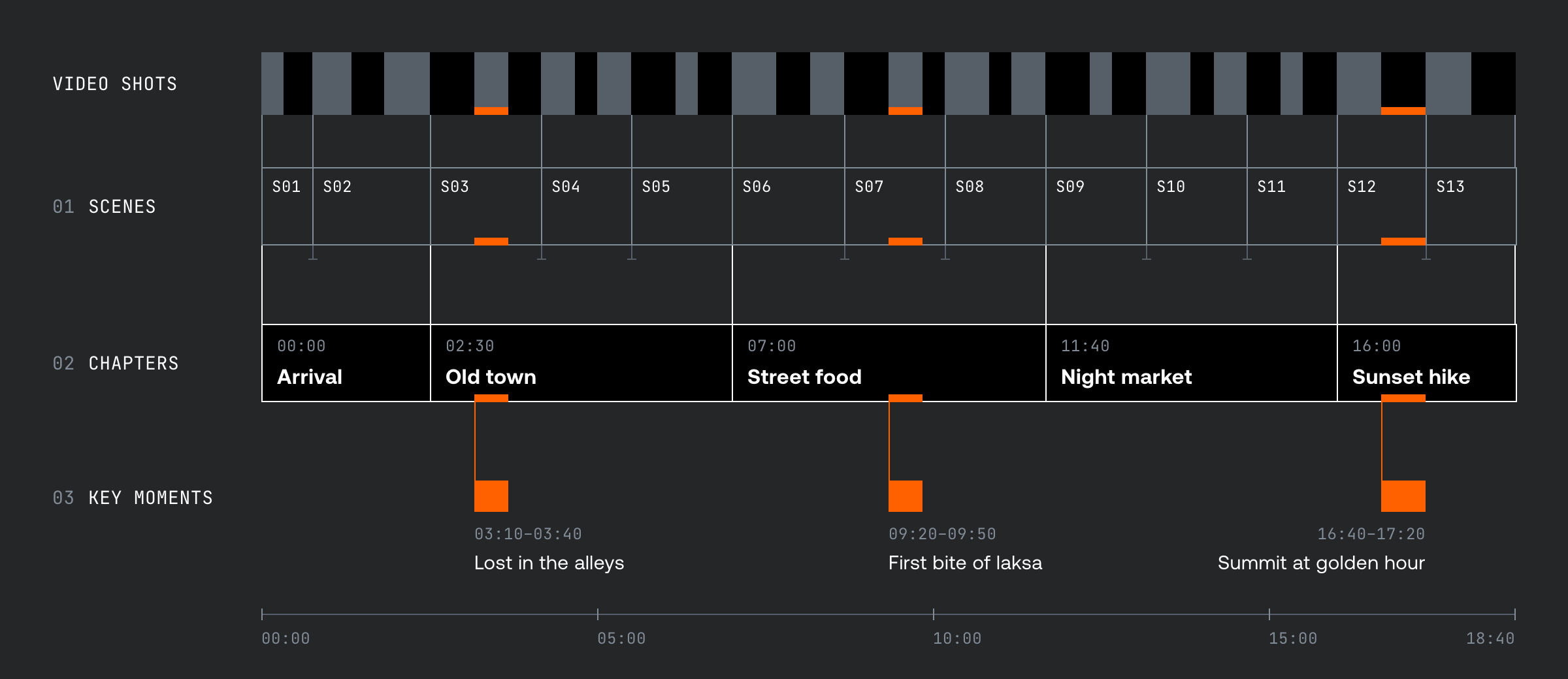
Fully understanding a video's structure used to mean running several Robots jobs: summarize for the title and description, generate-chapters for player navigation, find-scenes for segmentation, and find-key-moments for highlights. Each of those workflows works in isolation, but each one also re-reads the same video without sharing context with the others.
analyze-structure does it in one pass. One job returns a title, summary, tags, chapters, scenes, and key moments for an asset (or a bounded section of one), built from a shared pool of context rather than four independent analysis passes. Timestamps resolve to shot boundaries, and if you ask it to, the job writes the title and chapters straight back onto the asset, so your player gets the title and chapter markers without another API round trip.
It's an evolution of the foundational structural workflows, and for one of them it's the successor: find-scenes, as a standalone workflow, is deprecated with the move to API v1. Scenes are one of analyze-structure's outputs, so migrating is mostly a rename: create an analyze-structure job for the same asset, and read scenes from its result, along with the title, summary, chapters, and key moments you now get bundled in, and ready to go. find-scenes keeps working on v0 for the next six months (more on that in the API v1 section below).
Like every workflow, analyze-structure works through Directives, so you can run it automatically on every asset as it is uploaded. You can learn more about analyze-structure in the guide, and pricing details are available in the pricing docs.
New workflow: Generate Contextual Text
generate-contextual-text comes straight out of customer feedback. summarize is great for basic video descriptions, but when you need longer-form content, or more variants of that description, it gets repetitive. generate-contextual-text solves this by turning one asset into all the written things you actually need around it: social posts, blog posts, newsletter entries, long-form summaries. You describe the deliverables (an artifacts list with per-artifact channel, length cap, and format), optionally request multiple variants of the whole set, and steer the outputs with audience, voice, call-to-action, and brand terms:
POST /robots/v1/jobs/generate-contextual-text
{
  "parameters": {
    "asset_id": "YOUR_ASSET_ID",
    "output_steering": {
      "audience": "Video developers",
      "voice": "conversational"
    },
    "variants": [
      { "key": "product_led", "instructions": "Use a promotional, product-led angle." },
      { "key": "insight_led", "instructions": "Use an educational, insight-led angle." }
    ],
    "artifacts": [
      { "key": "x_post", "channel": "x", "max_length": { "unit": "characters", "value": 280 } },
      { "key": "blog_post", "max_length": { "unit": "words", "value": 1200 }, "format": "markdown" }
    ]
  }
}
Under the hood, the workflow extracts one editorial brief from the video itself (its central idea, supporting points, concrete details, and voice) and writes every variant and artifact from that shared brief.
If you run the request above on a video about shipping container architecture, the x_post comes back as something a little click-baity, like "Shipping container architecture is having a moment, and here's why", ready to post. It writes about the subject of your video, for the channel you asked for.
The obvious question: how is this different from pasting a transcript into an LLM? Grounding, mostly. The transcript stays authoritative for names, claims, and meaning, so the writing can't invent what your video says. One brief drives every artifact, so your X post and your blog post tell the same story. And it's a Robots job like any other: durable, webhook-delivered, and easy to integrate deeply, not a chat window to copy out of.
If all you want is a title, description, and tags, summarize is still the workflow for that. generate-contextual-text is for when you already know which written deliverables you want, and how they should read.
One option you shouldn't overlook: use_shots: true. It feeds frames from the video's detected shots into the writing as visual evidence, and when what's on screen matters to the story, it makes a real difference to the quality of the output.
You can learn more about generate-contextual-text in the guide, and pricing details in the pricing docs.
API v1
GA also brings a new version of the Robots API: v1, at /robots/v1. There are no core structural changes; if you know how to make jobs in v0, you already know v1. What v1 brings is consistency and better compatibility with the rest of the Mux API: media timestamps are seconds everywhere (whoops!), naming and field conventions now match across Mux Video and Robots, every track-producing workflow handles existing tracks the same way through replace_existing_tracks, and the deprecated parameters from the preview era are gone.
The migration is deliberately unhurried:
- v0 keeps working for six months. Existing v0 jobs and directives keep their original execution and webhook contracts, untouched. We'll support v0 for at least six months, and we'll give you plenty of warning before anything changes.
- Webhooks are additive. v1 jobs emit a new event family, robots.v1.job.<workflow>.<status> instead of the existing robots.job.* events, delivered to your existing webhook endpoints. You can update your handlers to accept both families, and migrate job creation safely when you’re done.
- Your agent can do the migration. There's a migration guide for you humans, including a ready-made prompt for your coding agent that walks it through updating your integration to v1. We'd love to hear how your agent gets on with it.
Try Robots without writing a line of code
The fastest way to get a feel for Robots is the Robots Playground in the Mux dashboard. It's not brand new, but it's better than ever since we launched it: pick one of your assets, run any workflow in the catalogue against it, and see the output fully rendered: chapters as a navigable list, Key Moments as playable clips, moderation scores with their per-thumbnail evidence.
My favourite part: every workflow in the Playground generates a copy-paste prompt for your coding agent, covering both the API call and what to do with the result ("Render the chapters as a clickable list that seeks Mux Player to each timestamp"). Try a workflow in the Playground, and if you like what you see, hand the prompt to your agent and it builds the integration.
Continuous improvements
A GA label is mostly earned in small pieces. Here’s a non-exhaustive list of what's shipped since the spring:
- Closing the loop inside the player. summarize can write the title onto the asset, generate-chapters can publish a chapters track, and find-best-thumbnails can set the asset's thumbnail. Robots doesn't just analyse your video; it can finish the job.
- Output steering and scoping. You can steer tone, audience, and brand terms on the text-producing workflows, and run any workflow against a time range of an asset rather than the whole thing. You're billed on the scoped duration, too.
- Smarter track handling. The new replace_existing_tracks option controls what happens to existing caption and audio tracks, you can name tracks yourself, and generated tracks now label themselves honestly ("English (Generated)", "Spanish (Auto-dubbed)").
- Premium captions went from brand new to production-ready. generate-premium-captions launched this spring and left experimental in September, picking up key terms and phrase lists (up to 1,000 entries) along the way.
- Moderation can act. moderate can optionally delete playback IDs on assets that exceed your thresholds, not just score them.
- Key Moments got sharper. Moments can now carry quotable segments, and shot-aware selection means clips start and end on real cuts.
- Translations that respect your vocabulary. translate-captions now takes a list of terms to never translate, so your product names and jargon survive the trip into other languages.
- Directives matured. Directives now emit run-level webhooks, fit more workflows per directive, and support the new workflows.
- Robots on the Free plan. Robots is included on every Mux plan, Free included, with 100,000 included units every month.
Plus a whole host of other platform and compatibility improvements along the way.
There's more to come
GA is a statement about stability, not completeness. We're still early in the Robots journey, we've been blown away by what customers have built during the preview, and the roadmap is longer than it's ever been.
One area in particular where we want your input: search. We've been building multimodal embeddings behind the scenes, and we think semantic search over video libraries, "find me every scene where someone opens a laptop", is one of the most exciting shapes this product can take. If you're building search, recommendations, or anything vector-shaped on top of video, we would love to talk to you about it.
Mux Robots is ready for you to use in production today. The docs have quickstarts for every workflow, the Playground is waiting in your dashboard, and as always, we'd love to hear your feedback, and to see what you build.