Migrate from self-managed video infrastructure to Mux
Use this guide when your team moves to Mux from self-managed video infrastructure such as AWS MediaConvert, S3, CloudFront, and FFmpeg. It covers setup, content migration, and pricing.
In this guide:
This guide is for teams that have built their own video infrastructure by stitching together multiple services — custom transcoding, object storage, general-purpose CDNs, and workflow orchestration — and are considering a move to Mux.
If your current setup involves three or more services and workflows for encoding, storage, delivery, analytics, and playback, this guide will walk you through migrating to Mux.
If you're building a new video product from scratch rather than migrating, check out our Mux fundamentals guide instead.
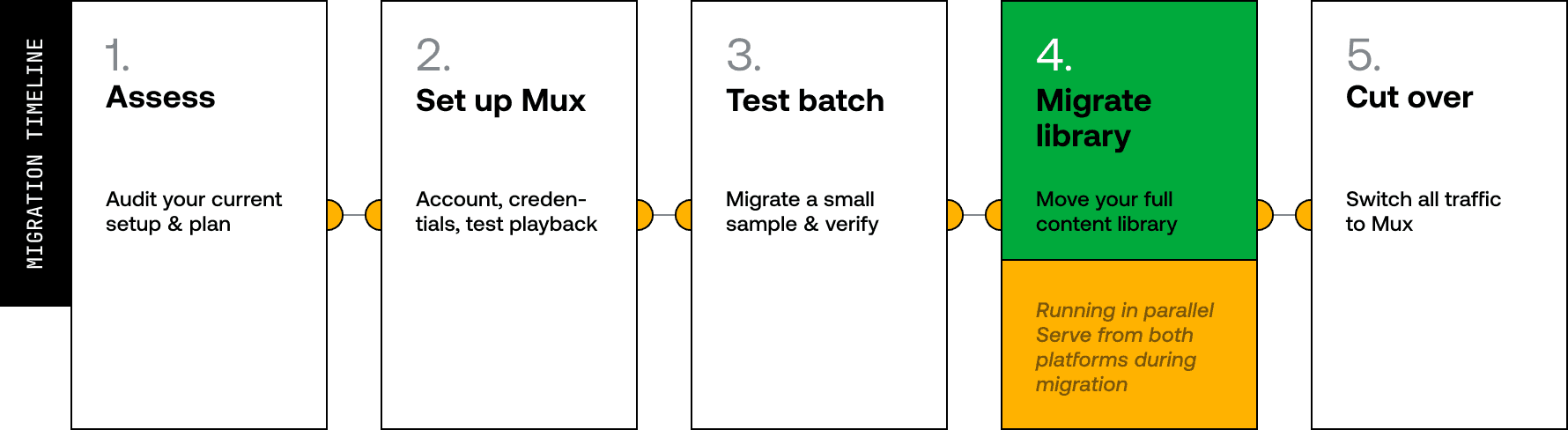
1Assess your current setup
Before migrating, take stock of your current video infrastructure. A typical DIY video workflow involves many different processes across multiple services. Mux replaces this entire stack with a single API:
- Direct uploads — Ingest video from your users or your storage with no separate upload server or bucket to manage
- Automatic transcoding — Every asset is encoded into multiple renditions with adaptive bitrate streaming out of the box
- Thumbnails and previews — Generate thumbnails, animated GIFs, and storyboards from any point in a video
- Auto-generated captions — Transcription and captioning built into the ingest pipeline
- Webhooks — Real-time notifications for asset status so you can update your CMS or database automatically
- Multi-CDN delivery — Global delivery without managing CDN configurations or origin servers
- Mux Player — Drop-in player for web, iOS, and Android with built-in analytics
- Mux Data — Video analytics including quality of experience, engagement, and performance metrics
2Get set up with Mux
To start using Mux, follow these steps. You can sign up for a free account.
- Sign up for a Mux account.
- Review Mux fundamentals to understand core concepts.
- Generate API credentials and install the Mux SDK for your stack.
- Upload a test video and verify playback works end-to-end.
- Set up webhooks and integrate Mux Player (or use any HLS player).
3Move your content
Mux supports both small and large libraries, so you can migrate any number of videos in a similar way.
Option 1: Use Truckload
Truckload is a migration tool that handles bulk content import. It runs as a hosted service with no infrastructure setup required, or you can self-host and customize it for your specific migration needs since it's open source.
- Works with S3‑compatible storage, Vimeo, Cloudflare Stream, and other sources
- Truckload pulls your content, sends it through the Mux processing pipeline, and prepares it for playback
- View current status in the Truckload dashboard
- You can run the migration in waves or all at once
- Use the hosted instance for simplicity, or fork and modify the open source version for custom workflows
Truckload runs on Inngest, a background job orchestration platform.
Option 2: Build your own migration flow
If you have specific requirements or if you're working with a CMS, You can run the migration yourself using the Mux API.
- To ingest your video files, call the Create Asset APIAPI with a URL pointing to your video files. Mux pulls and encodes them asynchronously.
- Whether you're on Contentful, Sanity, WordPress, or a custom CMS, store the returned Mux playback ID and asset ID against your existing content record in your CMS as each asset is processed.
- Listen for
video.asset.readywebhook events and use them to automatically update the corresponding record in your CMS the moment an asset is ready for playback. - Because you're updating records one by one as assets are processed, you can start serving content from Mux without waiting for the full migration to complete.
- Process your library in batches to stay within API rate limits, and use your CMS as the tracker for what's been migrated.
Here's an example migration script that lists videos in your S3 bucket and ingests them into Mux:
import Mux from '@mux/mux-node';
import { S3Client, ListObjectsV2Command } from '@aws-sdk/client-s3';

const mux = new Mux();
const s3 = new S3Client({ region: 'us-east-1' });

// List videos in your S3 bucket
const { Contents: objects = [] } = await s3.send(
  new ListObjectsV2Command({
    Bucket: 'my-video-bucket',
    Prefix: 'videos/',
  })
);

for (const obj of objects) {
  const asset = await mux.video.assets.create({
    inputs: [{ url: `https://my-video-bucket.s3.amazonaws.com/${obj.Key}` }],
    playback_policies: ['public'],
    video_quality: 'basic',
    passthrough: obj.Key, // Link back to your S3 key
  });

  console.log(`Created asset ${asset.id} for ${obj.Key}`);

  // Store asset.id and asset.playback_ids[0].id in your database
}
Things to keep in mind
Test first. Always test your migration flow with a small batch of sample content before migrating your full library.
Choose your video quality tier
Mux offers multiple video quality tiers to balance quality and cost based on your needs:
- Basic - Optimized for cost efficiency while maintaining solid quality for most use cases
- Plus - Higher bitrate encoding that delivers improved visual quality, especially for detailed content
- Premium - Premium quality encoding designed for content where visual fidelity is critical
You can set a default quality tier for your entire library and override it on a per-asset basis when needed. Basic and Plus are commonly used for general content, while Premium is useful when higher visual fidelity is required.
API rate limits
Understand Mux API rate limits for bulk operations during migration. For specific limits and 429 handling guidance, see API rate limits. When migrating a large library, use a background job queue to keep within limits and get reliable, retryable job processing.
Job management for bulk migrations
Enqueue a job per video, control concurrency, and let the queue handle retries on failure. Rather than polling Mux to check asset status, listen for the video.asset.ready webhook and trigger a job to update your database or CMS when it fires.
4How pricing compares
A DIY stack involves multiple services and line items — storage, bandwidth, transcoding, compute, and engineering overhead. Mux uses a single usage‑based pricing model.
Pricing model comparison
| Cost dimension | Self-managed | Mux |
|---|---|---|
| Storage | Per-GB object storage (S3 or equivalent), billed monthly for all stored data | Per-minute of stored video — no GB math needed. See Video pricing |
| Delivery | Per-GB bandwidth from your CDN (CloudFront, Cloudflare, etc.), tiered by region | Per-minute of delivered video, including multi-CDN. See Video pricing |
| Transcoding | Per-minute or per-job from your transcoding service (MediaConvert, etc.), varies by codec and resolution | Per-minute of input video at time of encoding — one price regardless of output renditions. See Video pricing |
| Player | Build your own or license a third-party player | Mux Player included at no additional cost |
| Analytics | Separate service or build your own | Mux Data included with every stream |
| Engineering overhead | Ongoing maintenance of orchestration, monitoring, error handling, and scaling across services | No infrastructure to manage or scale. You maintain an integration only |
Working example: 1,000 videos at 5 minutes average
To estimate costs with a DIY stack, you'd calculate separate line items for each service:
- Transcoding: 5,000 minutes of input × your transcoding service's per-minute rate, multiplied by the number of output renditions
- Storage: total GB across all renditions × your storage provider's per-GB monthly rate
- Delivery: estimated viewer-minutes converted to GB (varies by bitrate and resolution) × your CDN's per-GB rate, tiered by region
- Compute: Lambda invocations, workflow orchestration, monitoring, etc. This varies widely depending on your architecture
- Engineering time: the ongoing cost of maintaining, debugging, and scaling this infrastructure
With Mux, you'd estimate three line items:
- Encoding: 5,000 minutes of input video × the per-minute encoding rate for your chosen quality tier (free encoding if using Basic)
- Storage: 5,000 minutes of stored video × the per-minute storage rate
- Delivery: estimated viewer-minutes × the per-minute delivery rate
If you're converting from GB-based billing, these approximations can help: 720p ≈ 40 min/GB, 1080p ≈ 25 min/GB, 2K ≈ 15 min/GB, 4K ≈ 10 min/GB. See Estimating video costs for more detail.
Use the Mux pricing calculator to plug in your actual numbers and get a cost estimate. For tips on keeping costs optimized for your use case, see Optimizing video costs.
5Migration checklist
Use this checklist to track your migration progress.
Setup phase
- Mux account created and API credentials generated
- SDK installed and initial API request tested
- Test video uploaded and playback verified
- Mux Player integrated into your application
- Webhooks configured for
video.asset.ready
Content migration
- Migration approach determined (Truckload or custom API)
- Test migration completed with sample content
- Preferred video quality settings determined
- Job queue configured for bulk operations (if using API approach)
- Mux playback IDs stored in your database or CMS
- Video metadata carried over (e.g.
title,creator_id,external_id) using asset metadata - Full content library migrated and verified
6What's next
Once your content is migrated, you can access additional features available on the platform.
AI workflows
Now that your video is in Mux, you can access the primitives of each asset (audio, captions, summaries, key moments) to trigger AI-driven workflows:
- Create transcripts from your asset's audio
- Generate video chapters
- Generate titles, descriptions, and tags for your videos
- Moderate your content to detect inappropriate material
Security
- Signed URLs: Gate access to your content with time-limited, signed playback URLs. Ideal for paywalled content or private videos.
- DRM: Enterprise-grade content protection using Widevine, FairPlay, and PlayReady encryption.
Live streaming
- Live streaming: Stream live with low latency, built for interactive experiences.
- Simulcasting: Forward your live stream simultaneously to YouTube, Facebook, Twitch, and any RTMP-compatible destination.
Media generation
- Thumbnails and animated GIFs: Generate a thumbnail or animated preview from any point in any video.
- Video clipping: Create clips from your videos instantly.
- Static MP4 renditions: Create MP4 versions for offline downloads or short-form social use cases.
Video analytics
- Mux Data: Track viewer engagement with plays, unique viewers, and watch time. Monitor quality of experience metrics like startup time, rebuffering, playback success, and video quality which are then segmented by device, region, CDN, and more.