Legacy Video.js kit
Play Mux video with @mux/videojs-kit, the legacy Video.js 7 build with Mux features included. Use this guide only for existing integrations.
@mux/videojs-kit is built on Video.js 7 and is kept here for existing integrations. For new projects, see Video.js for Web.
Video.js kit is a build of Video.js 7 with Mux features included:
- Timeline hover previews
- Mux Data, through the
videojs-muxplugin - A
playback_idhelper that builds the full playback URL for you
The source code is on GitHub at muxinc/videojs-mux-kit.
Install Video.js kit
npm install @mux/videojs-kitImport the JavaScript and CSS:
import videojs from '@mux/videojs-kit';
import '@mux/videojs-kit/dist/index.css';
Or use the hosted versions from jsDelivr:
<script src="https://cdn.jsdelivr.net/npm/@mux/videojs-kit@latest/dist/index.js"></script>
<link rel="stylesheet" href="https://cdn.jsdelivr.net/npm/@mux/videojs-kit@latest/dist/index.css">
Add a <video> element with your playback ID as the source and video/mux as the type:
<video
  id="my-player"
  class="video-js vjs-16-9"
  controls
  preload="auto"
  width="100%"
  data-setup='{}'
>
  <source src="{PLAYBACK_ID}" type="video/mux" />
</video>
Video.js kit uses hls.js by default. To use Video.js's default playback engine instead (version 0.8.0 and later), import @mux/videojs-kit/dist/index.vhs.js.
Configure Video.js kit
Set options in data-setup, or pass them when you initialize the player with JavaScript:
<video id="my-player" class="video-js vjs-16-9" controls preload="auto" width="100%"></video>

<script>
const player = videojs('my-player', {
  timelineHoverPreviews: true,
  plugins: {
    mux: {
      debug: false,
      data: {
        env_key: 'ENV_KEY',
        video_title: 'Example Title'
      }
    }
  }
});

player.src({
  src: '{PLAYBACK_ID}',
  type: 'video/mux',
});
</script>
timelineHoverPreviews: trueturns on timeline hover previews.plugins.muxturns on Mux Data. Thevideojs-muxplugin is included, so you don't need to install it separately. See Monitor Video.js for metadata.
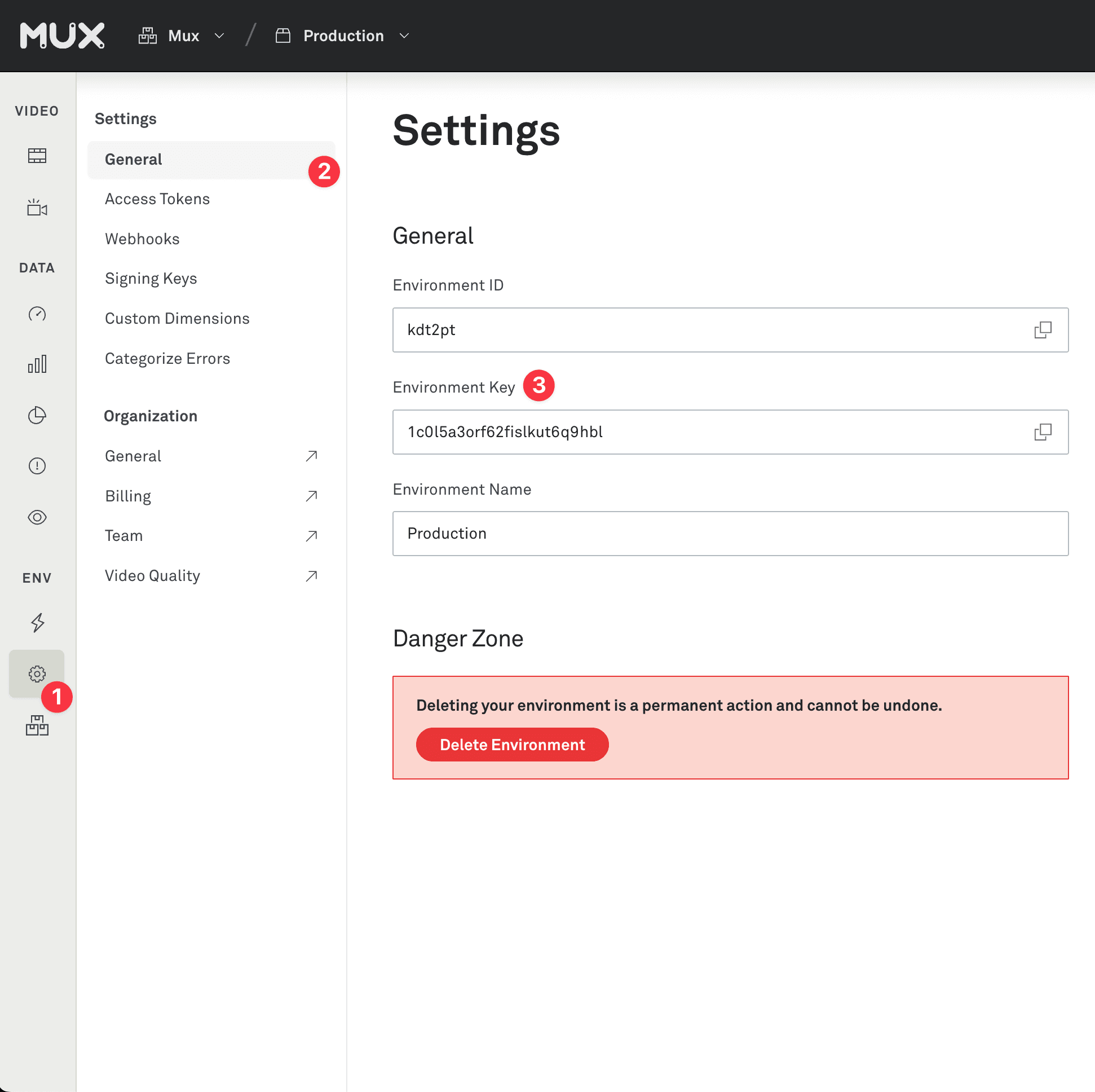
Get your ENV_KEY from the Mux environments dashboard.
Env Key is different than your API token
ENV_KEY is a client-side key used for Mux Data monitoring. These are not to be confused with API tokens which are created in the admin settings dashboard and meant to access the Mux API from a trusted server.
Signed URLs in Video.js kit
Signed playback is supported from v0.3.0. Append the playback token to the playback ID as the source:
player.src({
  src: '{PLAYBACK_ID}?token={JWT_VIDEO_TOKEN}',
  type: 'video/mux',
});
Video.js kit can't build the signed storyboard URL for timeline hover previews. Leave timelineHoverPreviews unset and pass the full storyboard URL instead, either as the timelineHoverPreviewsUrl option or with player.timelineHoverPreviews():
player.timelineHoverPreviews({
  enabled: true,
  src: 'https://image.mux.com/{PLAYBACK_ID}/storyboard.vtt?token={JWT_STORYBOARD_TOKEN}'
});
To turn hover previews off, call player.timelineHoverPreviews({ enabled: false }).
Quality selector in Video.js kit
From v0.10.0, Video.js kit includes the [videojs-contrib-quality-levels][] and [videojs-http-source-selector][] plugins. They're off by default. Turn the selector on with "httpSourceSelector": {} in the plugins option, or call player.httpSourceSelector().
Use other Video.js plugins with Video.js kit
Video.js kit uses Video.js's core.js build. If another Video.js plugin doesn't load, point video.js at the same build in your bundler. For example, with webpack's resolve.alias:
config.resolve = {
  alias: {
    'video.js': 'video.js/core',
  }
};
Video.js kit release notes
Current release: v0.11.0
This release enables configuring hls.js via Video.js options:
videojs('mux-default', {
  html5: {
    hls: {
      capLevelToPlayerSize: true
    }
  }
});
For advanced use cases, the hlsjs instance is exposed on the tech.
Previous releases
v0.10.0
- This release includes [
videojs-contrib-quality-levels][] and [videojs-http-source-selector][] by default.
v0.9.3
- Update Video.js version to v7.18.1.
v0.9.2
- Update hls.js to v1.1.5
v0.9.1
- As part of 0.7.0, tighter error handling integration with hls.js made all errors be triggered on the player. This meant that errors that don't inhibit playback and that hls.js handled automatically were treated the same as fatal errors that hls.js doesn't handle automatically. Now, only errors that hls.js considers fatal will trigger an error event.
v0.9.0
- Integrate with
videojs-contrib-quality-levels.
v0.8.0
- Introduce VHS build file
Check the GitHub releases page for the full version history.